![TrenDemon logo_on dark.png]](https://support.trendemon.com/hs-fs/hubfs/TrenDemon%20logo_on%20dark.png?height=39&name=TrenDemon%20logo_on%20dark.png)
Overview
Trendemon offers a robust "Cookieless Support" mode designed to respect user privacy while maintaining data continuity. When enabled, this feature ensures that your tracking behavior aligns strictly with user consent states.
This article explains how Trendemon manages visitor IDs, Marketing Automation (MA) pairing, and data storage before and after a user grants consent.
1. The Pre-Consent State (Cookieless Mode)
When a new visitor arrives on your site and the Support Cookieless option is enabled, Trendemon operates in a strict privacy mode until consent is explicitly confirmed.
During this phase, we prioritize data privacy by utilizing browser local storage rather than cookies:
- Visitor Identification: The Trendemon anonymous ID is securely stored in the browser’s local storage. This allows us to maintain the user's session and ensure data persistence without writing any files to the cookie jar.
- Zero-Footprint Approach: No headers or tracking files are written to the browser's cookie storage.
- Marketing Automation (MA) Pairing: During this phase, MA integration is effectively paused. We do not read, save, or send any MA-related data to our backend or browser storage.
2. Transitioning to the Consented State
Once a visitor grants permission via your Consent Management Platform (CMP), Trendemon automatically upgrades the tracking method to utilize standard first-party cookies.
Starting from the next page view after consent is granted:
- Cookie Activation: We begin storing standard Trendemon first-party cookies to handle identification.
- MA Integration Activation: If you have a Marketing Automation integration configured, the pairing process becomes active. We will read available MA data, send pairing requests to the backend, and persist the trd_ma_cookie to maintain the connection.
3. How Consent is Detected
To ensure our solution remains lightweight and compatible with any Consent Management Platform (CMP), Trendemon uses a "check-on-load" approach rather than relying on complex event listeners.
The Detection Logic:
Instead of attaching code to specific "Accept" or "Reject" buttons in your cookie banner, Trendemon checks the consent status upon every page load.
- If Consent is Granted: On the subsequent page view, we transition from local storage to standard cookies and activate integrations.
- If Consent is Revoked: If a user changes their settings to revoke consent, Trendemon detects this on the next page view and automatically deletes all Trendemon-generated cookies to ensure compliance.
Summary of Behavior
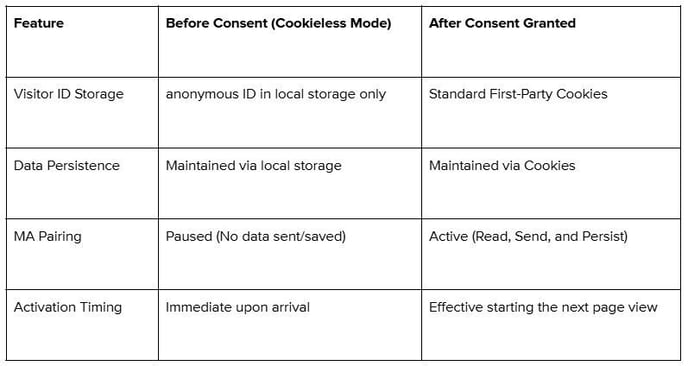
4. Cross-Domain Tracking & Fingerprinting
As the digital landscape evolves, leading browsers like Safari and Chrome are phasing out support for legacy tracking methods (specifically third-party cookies). This shift makes it challenging to track a single visitor's journey as they move between your different web properties across multiple domains - for example, navigating from your main website (company_name.com) to your blog (blog.company_name.com).
To bridge this gap and ensure you retain a unified view of the visitor journey, Trendemon utilizes Fingerprinting. It essentially looks at various device and browser parameters to distinguish between different visitors. When used in combination with other points of data, such as time and IP, it can provide a more accurate representation of visitors.