---
title: How Trendemon tracks Auto-tags
description: Tagging your content is an efficient method of organizing your content. Auto-tags are tags that are collected automatically from within the page as part of the content enrichment process.
---
[Skip to content](https://support.trendemon.com/how-trendemon-track-auto-tag#main-content)
English
Show submenu for translations
[](https://www.trendemon.com/?hsLang=en)
Open main navigation
Close main navigation
- English
Show submenu for translations
- [Go to trendemon.com](https://www.trendemon.com/)
[Go to trendemon.com](https://www.trendemon.com/?hsLang=en)
Hi! How can we help?
- There are no suggestions because the search field is empty.
1. [Success center](https://support.trendemon.com/?hsLang=en)
2. [FAQ & Troubleshooting](https://support.trendemon.com/faq-troubleshooting?hsLang=en)
# How Trendemon tracks Auto-tags
## Tagging your content is an efficient method of organizing your content. Auto-tags are tags that are collected automatically from within the page as part of the content enrichment process.
Tagging your content is an efficient method of organizing your content. For more info on how TrenDemon leverage tags, can be found [here](https://support.trendemon.com/create-a-page-tag?hsLang=en).
Auto tags are tags that are collected automatically from within the page as part of the content enrichment process.
#### How does it work?
As part of the enrichment process, Trendemon reads 3 types of tags from within your page: Page tags, Category tags, Author tags. All tags, no matter what type have the same weight and functionality in Trendemon.
### **Page tags**
The process searches for the all "**article:tag**"meta tag in the website header:
**\**
**\**
If this tag doesn’t exist the process would search the first matching element within the page and grab the tag from their [inner text](https://www.w3schools.com/jsref/prop_node_innertext.asp):
***\[class=topic-link\]***
***a\[class=tags\]***
***a\[rel='tag'\]***
***a.topic***
The tag value would be **“tag 1”**
**Page Category tags**
The system looks for these meta tag in the website header:
**\**
**\**
The tag will be created in the next format: “category:” for example **“category:food”**
Important – these tags or elements should exist within the page itself (not on the category page).
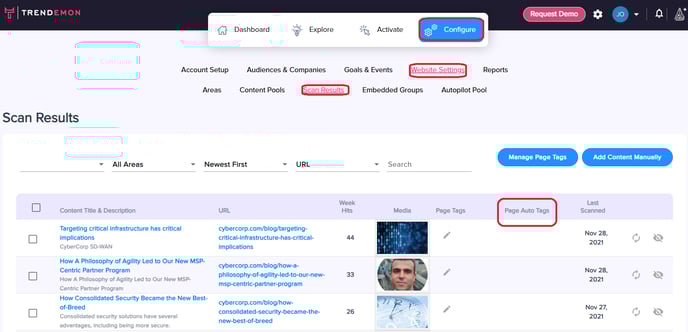
To find the auto-tags collected to each URL you can visit the Scan Results screen by navigating to Configure \> Website Settings \> Scan Results, and view the "Page Auto Tags" column :
You can also add manual tags to the different pages to categorize them directly in Trendemon [click here to read more](https://support.trendemon.com/managing-page-tags?hsLang=en).
- [Getting started](https://support.trendemon.com/getting-started?hsLang=en)
- [Personalization](https://support.trendemon.com/personalization?hsLang=en)
- [Integrations](https://support.trendemon.com/integrations?hsLang=en)
- [Account based orchestration](https://support.trendemon.com/account-based-orchestration?hsLang=en)
- [Privacy, Security and Compliance](https://support.trendemon.com/privacy-security-and-compliance?hsLang=en)
- [FAQ & Troubleshooting](https://support.trendemon.com/faq-troubleshooting?hsLang=en)
- [Best Practices](https://support.trendemon.com/best-practices?hsLang=en)
[](http://trendemon.com?hsLang=en)
Trendemon Success Center
Copyright © 2026, Trendemon