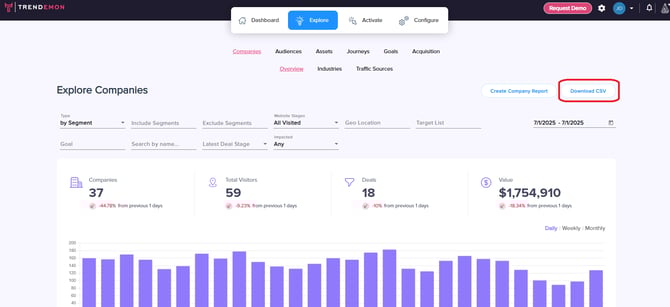
The Explore Companies screen provides a detailed view of all the accounts visiting your website, information regarding company journey, and conversion to business goals and pipeline. You can access this screen by navigating to Explore > Companies.
You can filter this view based on audiences / segments / target lists, company geographic location, business goals, deal stages, companies that engaged with Trendemon personalization (impacted by Trendemon) and more.
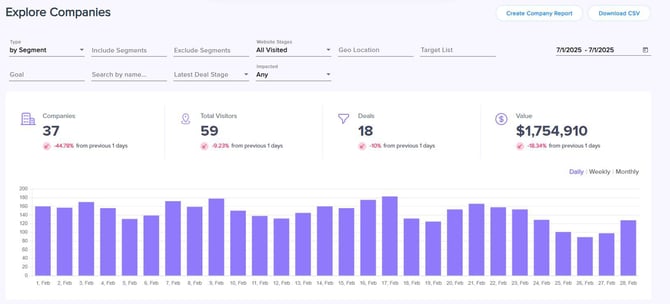
Totals metrics
The top section allows you to see the total number of companies that visited your website in the selected timeframe, and the total number of visitors from these companies. You can also explore the visiting trend of companies by day, week, or month.
If your CRM (Salesforce or Hubspot) is integrated with Trendemon, you will also see the number of deals associated with the visiting companies and their total value.
Detailed Table
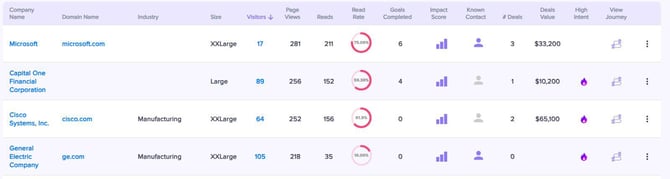
The detailed table displays specific information for each of the visiting companies. Here you can explore firmographic information regarding the company (such as industry and size) alongside the following additional metrics:
- Visitors - total amount of visitors from this company.
- Pageviews - total amount of pageviews by this company.
- Reads - total amount of pages read by this company. This is a unique Trendemon metric based on scroll depth and time spent on the page.
- Read rate - Percentage of pageviews marked as “read” by this company out of total pageviews.
- Goals completed - How many goals were completed by visitors from this company.
- Impact score - Website engagement score for this company in the past 30 days, based on sessions and reads.
- Known Contact - The person icon indicates the status of known contacts:
- Purple: The company has at least one visitor with a known email.
- Gray: No known emails are associated with this company.
- #Deals - amount of deals associated with this company based on your CRM data.
- Deals Value - total of deals values associated with this company based on your CRM data.
- High Intent - This column indicates whether this company is marked as high intent or not. High Intent is a unique metric you can customize in Trendemon.
- View Journey - Clicking on this icon will lead you to a standalone report named Company Engagement Report. Click here to learn more.
Exporting Data
You can download this table to a CSV file by clicking on the “Download CSV” button at the top right corner of the Explore Companies screen.